Guardrails
Set boundaries for your agent — define how it handles restricted topics or situations with a fixed, consistent answer.
Guardrails are boundaries you set for your agent. They let you decide exactly how the agent handles certain topics or situations, with a fixed, consistent answer.
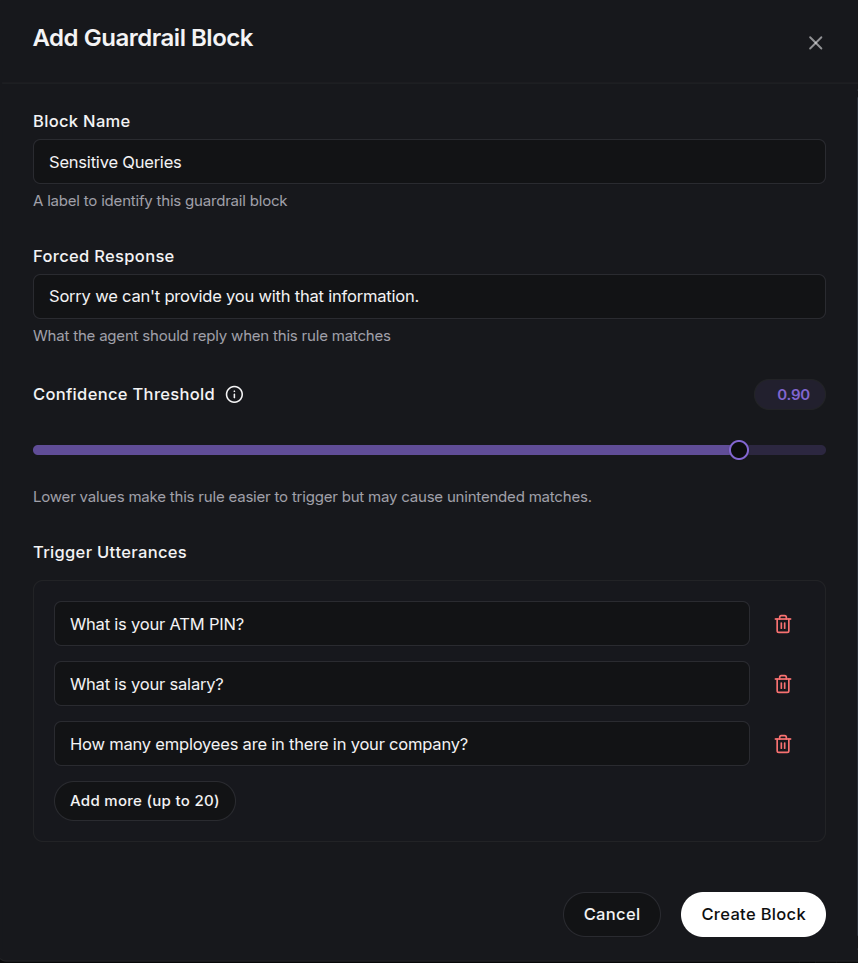
Configuring a Guardrail
When you create or edit a guardrail, you work with these fields:
Block Name
A clear name for the rule, such as "Billing Dispute" or "Refuse Discounts". This helps you find and manage the rule later.
Forced Response from Agent
The exact words the agent must use when the guardrail is triggered. This keeps the agent on-brand and compliant for sensitive or regulated topics.
Confidence Threshold
A slider from 0 to 1 that controls how closely the caller's words must match your trigger phrases.
- Lower values (near 0): The guardrail triggers more easily.
- Higher values (near 1): The match must be more exact before the guardrail activates.
Trigger Utterances
Sample phrases that represent what a caller might say to trigger this rule. The more varied examples you provide, the better the agent understands the intent behind different ways of saying the same thing.
Example: Refuse Discounts
Let's say your pricing is fixed and you never offer discounts. Here is how you'd build the guardrail:
| Field | Value |
|---|---|
| Block Name | Refuse Discounts |
| Forced Response | "I'm sorry, we don't offer discounts at this time. Would you like me to help you with anything else?" |
| Confidence Threshold | 0.8 |
| Trigger Utterances | "Can you give me a discount?", "Is there any offer?", "That's too expensive, lower the price", "Do you have a sale?" |
Now if a caller asks "Can you do better on price?", the agent matches one of the trigger phrases and replies with the forced response instead of making up its own answer.
Best Practices
- Be specific: Keep trigger phrases distinct so rules don't overlap with each other.
- Test your thresholds: Use the simulator to find the right confidence setting for your rule, usually between 0.7 and 0.85, to avoid false triggers.
- Review scripts: Update forced responses regularly to match current policies or promotions.